Clean data
janitor package for cleaning variable names
When we create data files, we frequently use variable names and formats that are easily readable for humans, but no so for computers.
Data scientists, according to interviews and expert estimates, spend from 50 percent to 80 percent of their time mired in this more mundane labor of collecting and preparing unruly digital data, before it can be explored for useful nuggets. – For Big-Data Scientists, ‘Janitor Work’ Is Key Hurdle to Insights The New York Times, 2014
janitor has many functions, but its core function is clean_names() which will make your life easier if you call it whenever you load data into R. The following example is taken from janitor’s documentation page
Let us read an Excel file with a roster of teachers at a fictional American high school, stored in the Microsoft Excel file dirty_data.xlsx.
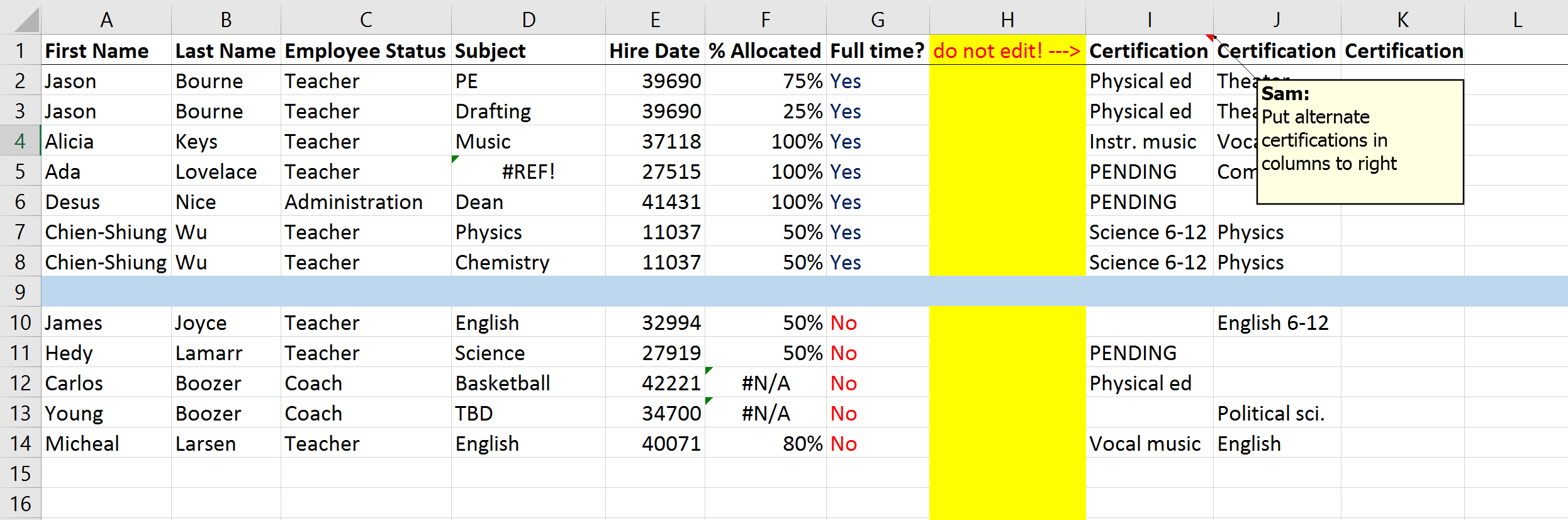
Some of the variable names, e.g., First Name, Last Name, are not only capitalised, but also contain a space in the variable name. Let us read in the file and have a glimpse inside it.
roster <- readxl::read_excel(here("data", "dirty_data.xlsx"))

glimpse(roster)
## Rows: 13
## Columns: 11
## $ `First Name` <chr> "Jason", "Jason", "Alicia", "Ada", "Desus", "Ch...
## $ `Last Name` <chr> "Bourne", "Bourne", "Keys", "Lovelace", "Nice",...
## $ `Employee Status` <chr> "Teacher", "Teacher", "Teacher", "Teacher", "Ad...
## $ Subject <chr> "PE", "Drafting", "Music", NA, "Dean", "Physics...
## $ `Hire Date` <dbl> 39690, 39690, 37118, 27515, 41431, 11037, 11037...
## $ `% Allocated` <dbl> 0.75, 0.25, 1.00, 1.00, 1.00, 0.50, 0.50, NA, 0...
## $ `Full time?` <chr> "Yes", "Yes", "Yes", "Yes", "Yes", "Yes", "Yes"...
## $ `do not edit! --->` <lgl> NA, NA, NA, NA, NA, NA, NA, NA, NA, NA, NA, NA, NA
## $ Certification...9 <chr> "Physical ed", "Physical ed", "Instr. music", "...
## $ Certification...10 <chr> "Theater", "Theater", "Vocal music", "Computers...
## $ Certification...11 <lgl> NA, NA, NA, NA, NA, NA, NA, NA, NA, NA, NA, NA, NAWe notice that if we wanted to refer to the variable for a first name (1st in the list) or percent allocated (6th in the list), we would need to refer to them as the string “First Name” and “% Allocated” respectively. To avoid this, we can use janitor::clean_names()
roster_clean <- roster %>%
  clean_names()

glimpse(roster_clean)
## Rows: 13
## Columns: 11
## $ first_name <chr> "Jason", "Jason", "Alicia", "Ada", "Desus", "Chie...
## $ last_name <chr> "Bourne", "Bourne", "Keys", "Lovelace", "Nice", "...
## $ employee_status <chr> "Teacher", "Teacher", "Teacher", "Teacher", "Admi...
## $ subject <chr> "PE", "Drafting", "Music", NA, "Dean", "Physics",...
## $ hire_date <dbl> 39690, 39690, 37118, 27515, 41431, 11037, 11037, ...
## $ percent_allocated <dbl> 0.75, 0.25, 1.00, 1.00, 1.00, 0.50, 0.50, NA, 0.5...
## $ full_time <chr> "Yes", "Yes", "Yes", "Yes", "Yes", "Yes", "Yes", ...
## $ do_not_edit <lgl> NA, NA, NA, NA, NA, NA, NA, NA, NA, NA, NA, NA, NA
## $ certification_9 <chr> "Physical ed", "Physical ed", "Instr. music", "PE...
## $ certification_10 <chr> "Theater", "Theater", "Vocal music", "Computers",...
## $ certification_11 <lgl> NA, NA, NA, NA, NA, NA, NA, NA, NA, NA, NA, NA, NANow, the variable names contain no spaces, are all lower case, and we can explicitly refer to them rather than using a string of characters– it all makes life a bit easier!
Code that works is not necessarily good code
According to Phil Karlton, there are only two hard things in Computer Science: cache invalidation and naming things. It is good practice to use meaningful names for variables and data frames, use spacing, comments, etc. Both Google and Hadley Wickham have great style guides for programming in R and the janitor package helps in creating variable names with a consistent style.